
A clustered egress provides automated redundancy and load balancing across multiple SoundStack points of presence.
NOTE: Monetization is available for customers through a SoundStack agreement. For more information about this, you can contact us here
Clustered egresses also support additional features such as delivering streams via the HLS protocol. Creating a clustered egress will automatically deploy the stream onto multiple SoundStack points of presence and provide load balancing between them.
Here is our step-by-step guide on how to view a Clustered Egress:
1. Login to SoundStack Stream.
2. From the left-side navigation menu, click on Publishers.
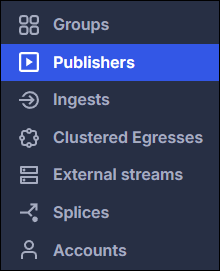
3. Select the publisher of your choice, then click on the Clustered Egress you prefer.
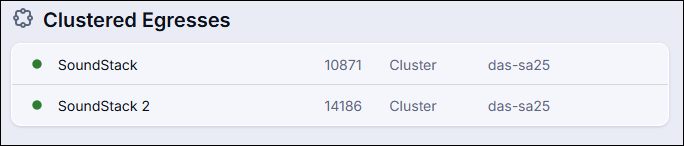
4. Here you'll find the name of the clustered egress along with the cluster assigned by SoundStack.
5. The next section lists the Encoding settings. A widely used configuration for audio streaming is the MP3 codec, set at a bitrate of 128 kbps and a sample rate of 44.1 kHz, utilizing Joint Stereo channel mode and a constant bitrate (CBR). Alternatively, AAC can be used. All settings are configured by SoundStack as part of the initial deployment and can be adjusted later by SoundStack if needed.
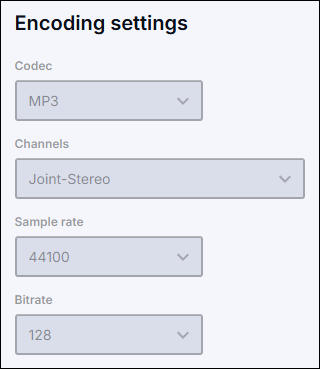
Note: Make sure the settings in your encoder match the Encoding settings, as this also affects the system's ability to seamlessly fail over between ingests.
5. Next, you can see the Session limit, which controls how long a listener can stay connected to the Clustered Egress before they need to restart the stream. This feature requires listeners to manually restart the stream after the number of hours listed here, preventing streams from remaining open for extended periods and helping you stay compliant with music licensing obligations.
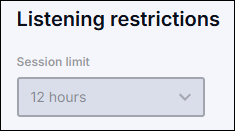
Note: By default, there is no session limit. If you would like to set a specific limit, please contact SoundStack, and we'll be happy to configure it for you.
6. The last section is Geo-blocking. This is particularly useful if you only have music licensing in a specific country. The first option allows all countries except the ones you specify, and the second option does not allow any countries except the ones you specify. For example, if you only have music licensing in the US, you should request Soundstack configure "Allow no countries except United States"

Note: Geo-blocking is not yet available for Clustered Egresses, as this feature is still under development.
Note: Aliases are an additional feature not currently displayed on the dashboard. They can be used to simplify URLs, maintain branding consistency, or create a more user-friendly reference for a stream. To set up aliases, please reach out to SoundStack.
NOTE: For further details about how to access your stream URL, please refer to the following article:
If you have any further questions or concerns, please do not hesitate to contact our Support Team through the ticket submission form or by emailing us at support@soundstack.com.